Configuring CFD runs
Setting up the CFD solver
The settings for the CFD solver are all displayed in the Settings tab of the active performance curve in the workspace tree. They reflect the settings made in the corresponding CFturbo design under Export - Simerics and may be fully edited.
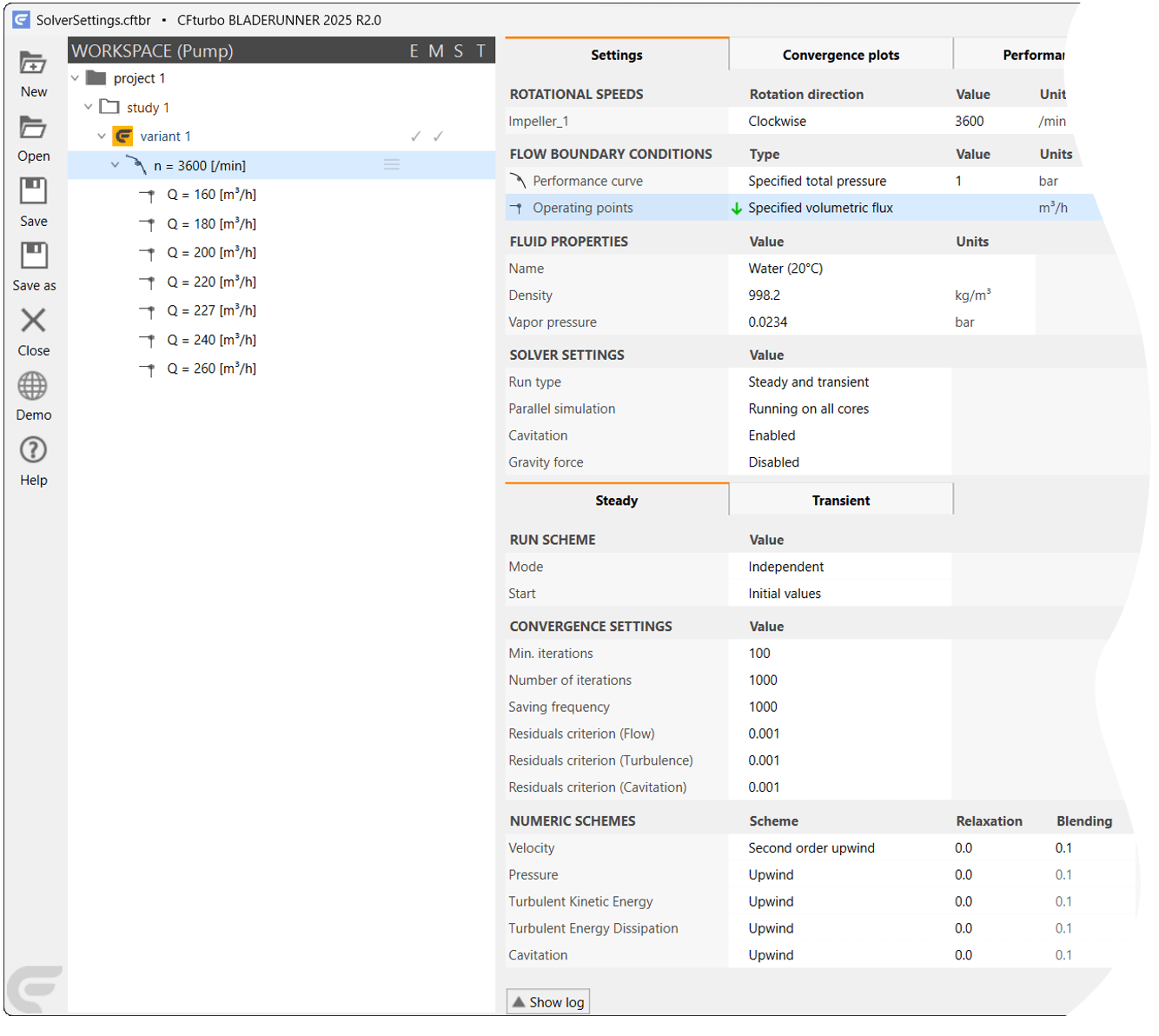
Active performance curve (left), CFD solver settings in the Settings tab (right)
Rotational speeds
The main parameter of a performance curve is the rotor speed, which is specified under ROTATIONAL SPEEDS and is to be adjusted there for other performance curves created for the same variant.
In multi-stage units, all rotors contained are listed under ROTATIONAL SPEEDS, such as for the CP nq19 (three stages), one of the CFturbo sample projects. Here the Use for caption option allows the speeds of all three impellers to be included in the name of the performance curve, which would not be necessary as they are mounted on the same shaft and therefore have the same speed. However, there could also be a free-running turbine stage, for example.
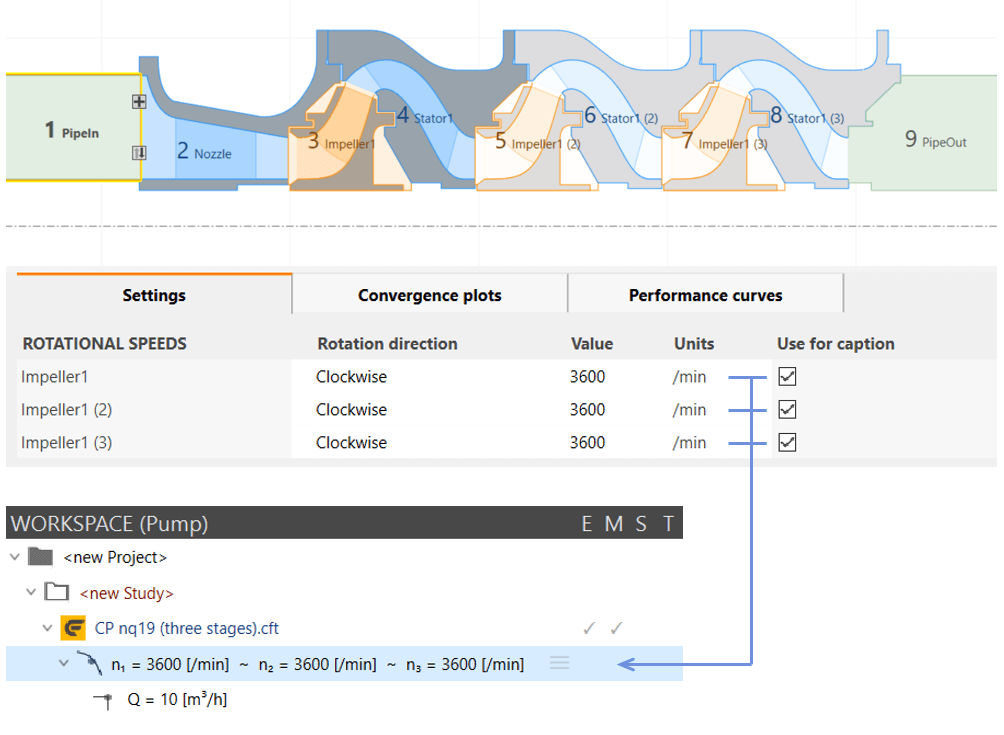
Rotational speeds of a three-stage centrifugal pump
Boundary conditions
CFturbo designs usually feature two boundary conditions defined under FLOW BOUNDARY CONDITIONS. The inflow boundary condition - a constant total pressure for example - applies to the entire performance curve and can be included in its name by the Use for caption option. The outflow boundary condition, usually a mass or volume flow, is changed for each operating point, thus forming the X axis values of the performance curve. The names of the inflow and outflow surfaces can be found under Locations.
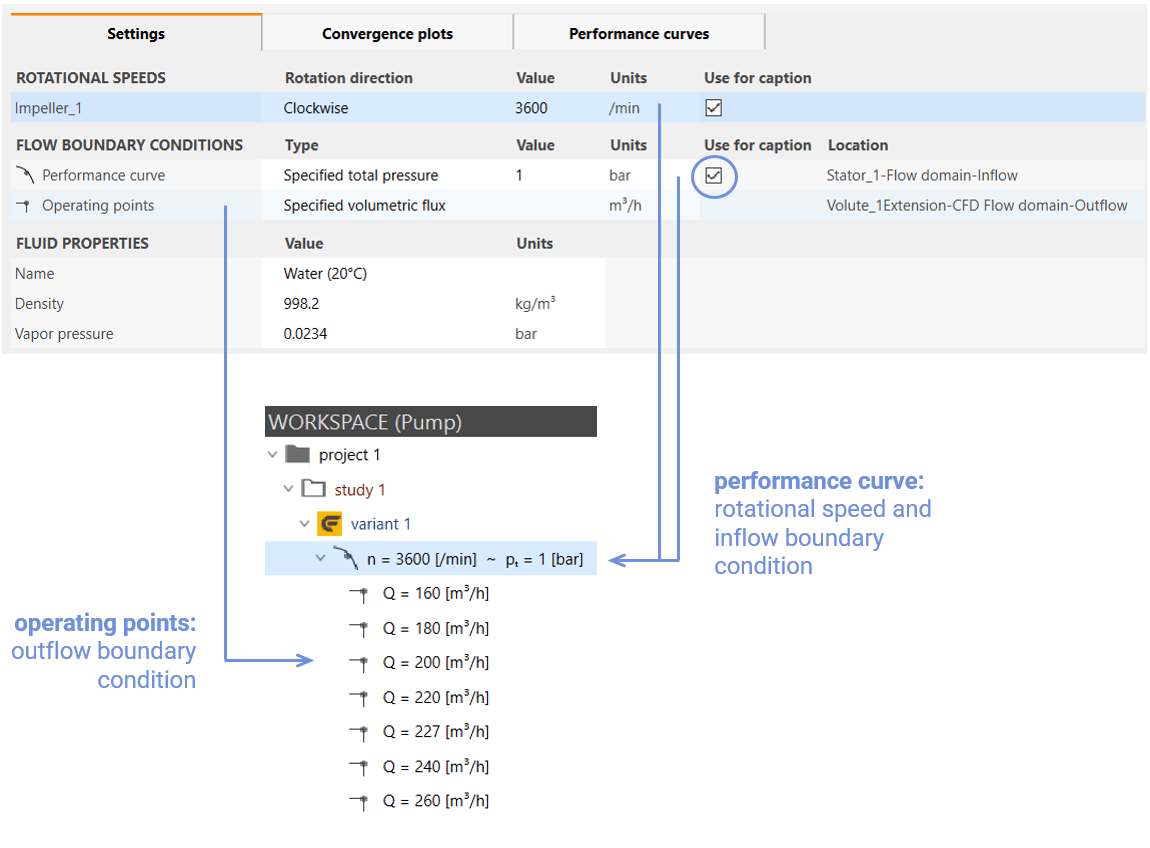
Inflow and outflow boundary condition
Fluid properties
FLUID PROPERTIES lists the fluid parameters read from the CFturbo file that are used for the flow simulations.
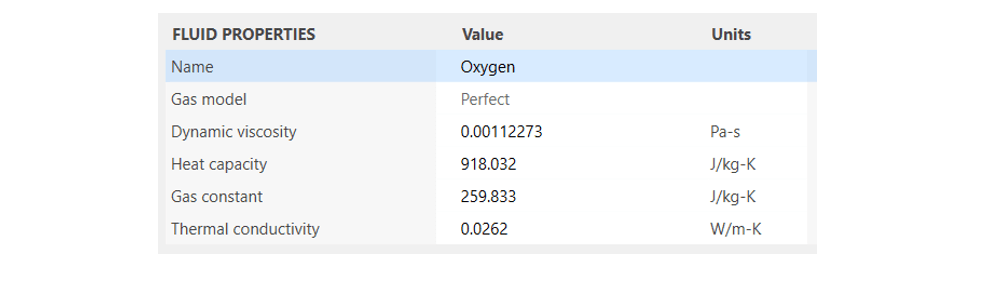
Fluid properties for oxygen taken from the CFturbo file
Steady-state and transient CFD runs
In Simerics MP/MP+, steady-state flow simulations are performed by use of a frozen rotor method, which already provides good accuracy of the calculated flow field if the rotor-stator interaction is not too complex. However, the speed of the Simerics MP/MP+ solver also allows transient flow simulations to be carried out in a relatively short time.
CFturbo BLADERUNNER is capable of automatically performing steady-state and transient CFD runs for any number of performance curves and single operating points. The behavior of the flow solver can be defined individually for each operating point. A CFD run may be started from new or continued. Or an existing result can serve as the starting solution for a new CFD run.
In the SOLVER SETTINGS section, the many options for steady-state and transient flow simulations can be easily and conveniently configured. They apply to the entire performance curve.
Run type
The most important setting is the Run type with the options
Steady
Transient
Steady and transient
Steady starts one or more steady-state CFD runs, depending on the selection in the workspace tree, while Transient starts one or more transient CFD runs.
If the Steady and transient option is set for a flow simulation CFturbo BLADERUNNER first starts a steady-state CFD run, terminates it when the convergence criteria or the maximum number of iterations are reached, and starts a transient CFD run thereafter. After completion, both a steady-state and a transient result are available.

The initialization of these flow calculations is defined later under RUN SCHEME. It makes sense, for example, to initialize a transient simulation started with Steady and transient with the result of the steady-state simulation.
Parallel computing
The Simerics MP/MP+ solver is, of course, designed for parallel computing. CFturbo BLADERUNNER offers the following options under Parallel simulation:
Running on all cores - default setting: use of all available CPU cores (if covered by licenses)
User defined number of cores - use of fewer than the available number of CPU cores
Multi-threads (Version 4 Mode) - outdated mode for compatibility with Simerics MP/MP+ 4

Cavitation and gravity force
Simerics MP/MP+ uses its cavitation module for computing cavitation in liquids, which can be enabled or disabled in CFturbo BLADERUNNER using the Cavitation option. If no license for the cavitation module is available for the CFD run in Simerics MP/MP+ it is performed without this module.
When activated in a steady-state flow simulation, cavitation may lead to divergence if the cavitation area exceeds a certain size in the flow field. In such cases, it is recommended to perform an incompressible, steady-state simulation without the cavitation module to be followed by a transient simulation with this module enabled. Also a transient simulation with the cavitation module enabled may be started directly.

The Gravity force option is used to enable or disable the computation of gravity effects in the flow field.

Setup for steady-state CFD runs
A steady-state simulation is the method of choice for quickly testing the behavior of a CFturbo design. For a single-stage turbomachine it is possible to calculate flow fields for a complete performance curve on a 32-core CPU in half an hour. Since CFturbo BLADERUNNER controls the flow simulations in the background, the user can work on new variants of the CFturbo design at the same time.
Selecting Steady or Steady and transient as the Run type in the SOLVER SETTINGS, a Steady tab appears with the sections
RUN SCHEME
CONVERGENCE SETTINGS and
NUMERIC SCHEMES
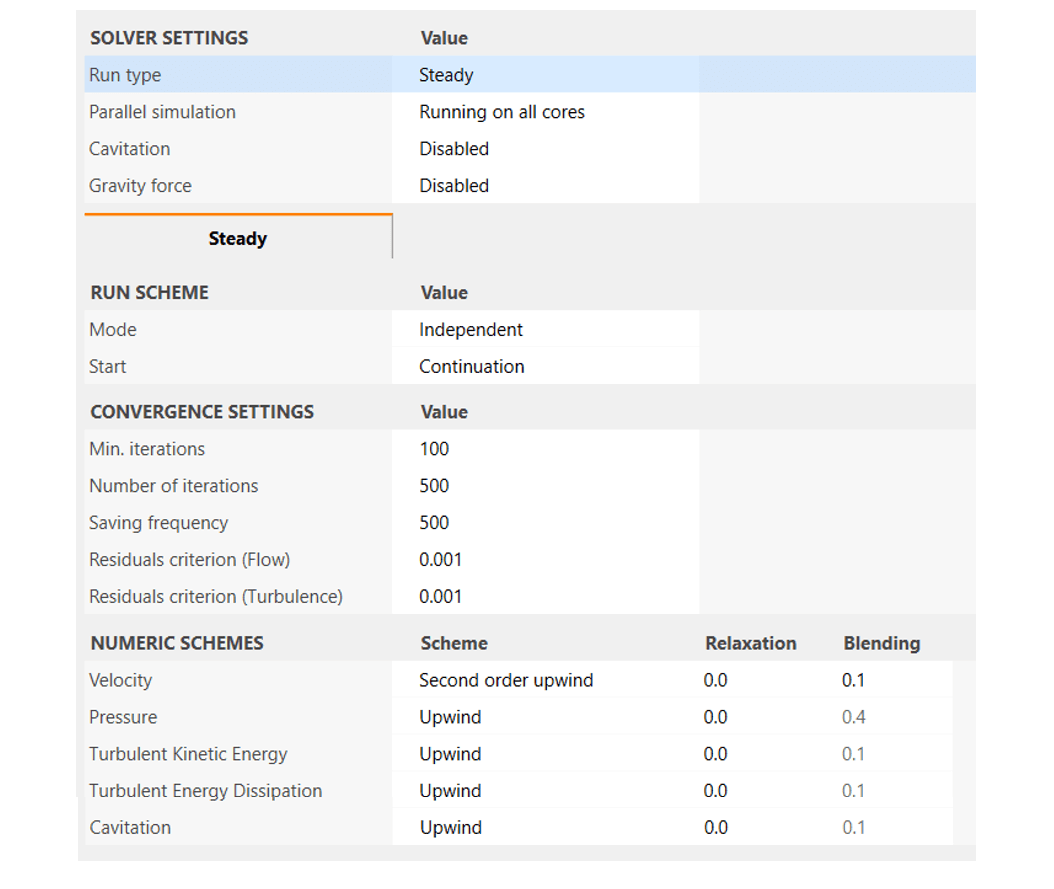
Configuring steady-state flow simulations in the SOLVER SETTINGS
RUN SCHEME
RUN SCHEME determines the sequence and initialization for processing the individual operating points of a performance curve.
If Mode is set to Intelligent the mesh cells of an operating point are initialized with the values of an adjacent operating point when starting a CFD run and therefore processed at higher speed. Independent causes the operating points to be processed without initialization.

In Intelligent mode flow simulations are either run from the Middle of a performance curve, focussing on the design point, or from the Lowest value of an operating point, i. e. from top to bottom in the workspace tree, or from the Highest value at the bottom to the top.
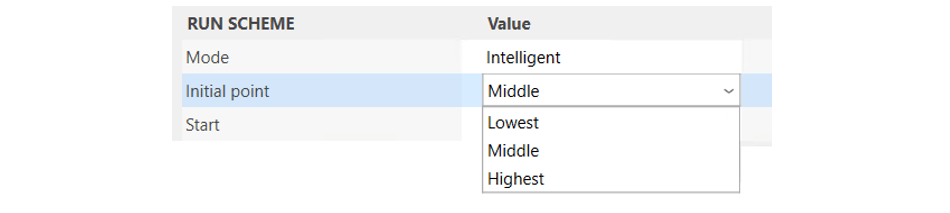
If a flow simulation has already been performed for an operating point, an .sres result file from Simerics MP/MP as well as integral values of the performance curves and residual data are available. The flow simulation, however, might have not fully converged, either due to an insufficient number of iterations or due to solver settings that caused instability in the computation.
Selecting the Continuation option under Start, the current result is used to initialize a new CFD run, which usually cuts time in reaching a fully converged result. The Initial values option is preferred if the previous result showed poor convergence and a new CFD run has to be started without initialization, for example if oscillation occurred on a high residual level or if the computation even diverged.
If no result is available because a simulation is being run for an operating point for the first time or the result has been deleted, the Continuation option leads to a new computation without initialization, just like Initial values, and is therefore recommended.
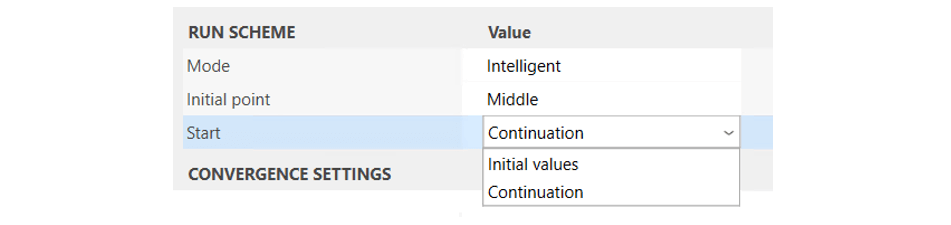
CONVERGENCE SETTINGS
The CONVERGENCE SETTINGS directly map the settings in Simerics MP/MP+ - apart from Min. iterations - to specify the duration and accuracy of a simulation by the number of iterations and the convergence criteria.
At first sight, defining a minimum number of iterations seems illogical, since flow simulations are stopped when the convergence criteria are fulfilled. However, it can happen that characteristic values still change even though the convergence criteria have been met. By defining a minimum number of iterations to be performed stable characteristic values can then be achieved.
Min. iterations - range 1 .. [no. of iterations]
Number of iterations - range [min. no. of iterations + 1] .. 5,000
The following convergence criteria for the Flow, Turbulence, and Cavitation module can be found in Simerics MP/MP+ in the Model tab:
Residuals criterion (Flow) - range 1e-05 .. 0.1
Residuals criterion (Turbulence) - range 1e-05 .. 0.1
Residuals criterion (Cavitation) - range 1e-05 .. 0.1
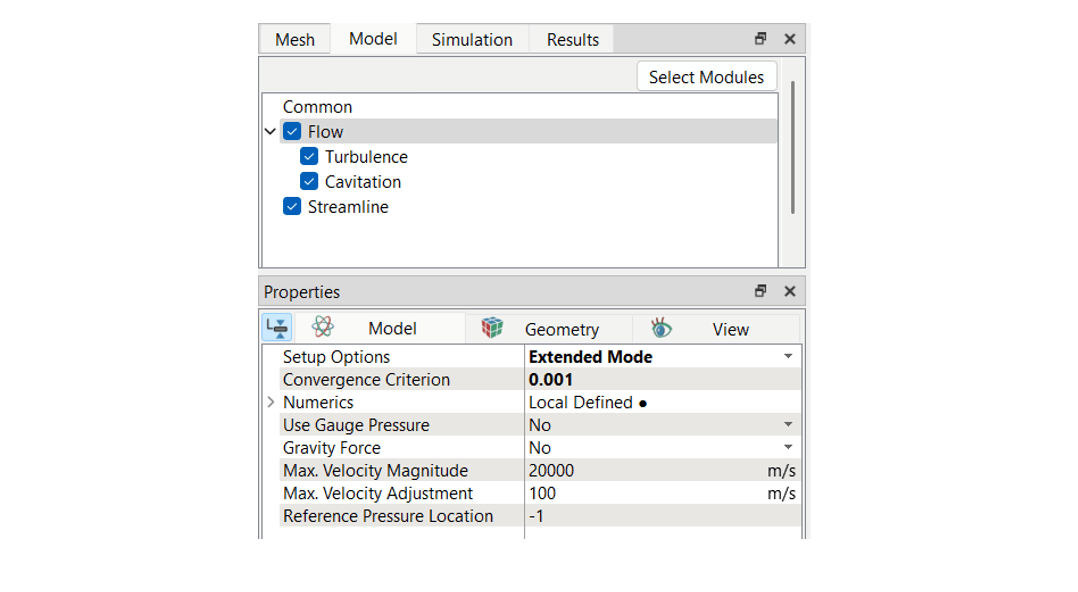
Simerics MP/MP+ convergence settings
The CONVERGENCE SETTINGS can be changed dynamically during a CFD run, for example to enable further iterations in case of a convergence rate lower than expected or to widen the convergence criteria. Since the convergence rate also depends on the flow field at a specific operating point, separate criteria can also be defined for each operating point during the run. If an operating point is activated in the workspace tree for this purpose and the Identical to parent performance curve option is deactivated in its Settings tab, adjustable convergence settings appear only for this operating point.
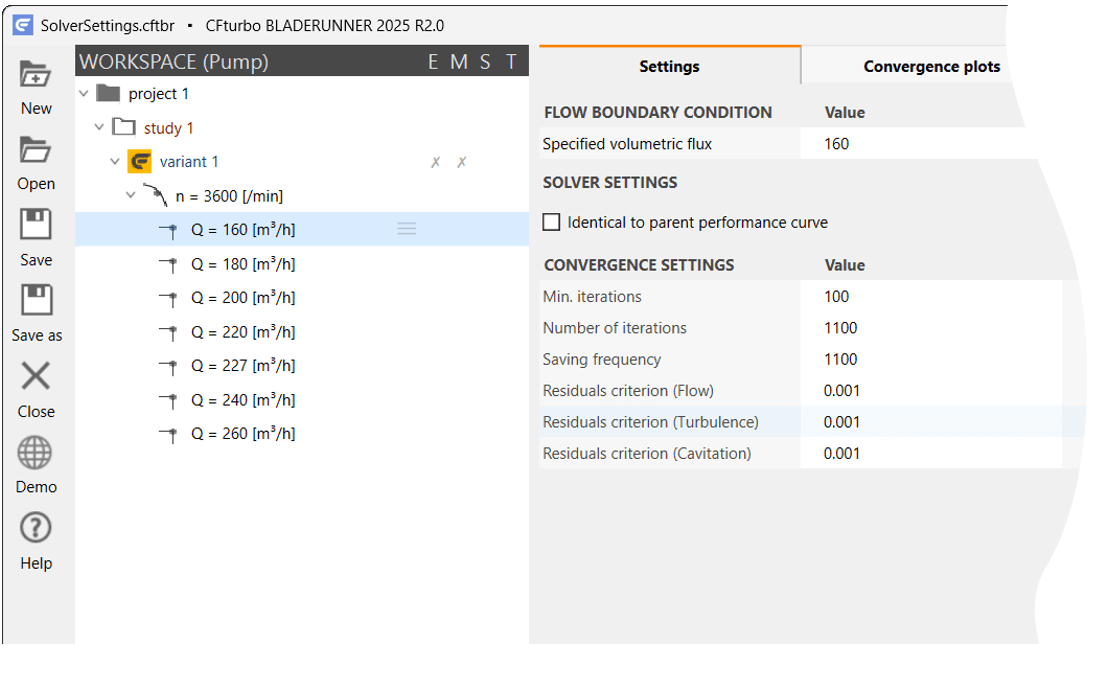
Convergence settings for an individual operating point
NUMERIC SCHEMES
The NUMERIC SCHEMES section indicates the available Simerics MP/MP+ settings shown in the Model tab for numeric scheme, relaxation, and blending factor. Simerics MP/MP+ uses either a 1st order upwind scheme, a central difference scheme or a 2nd order upwind scheme, which can be selected as
Upwind
Central or
2nd order upwind
for the
Velocity
Pressure / density
Turbulent kinetic energy
Turbulent energy dissipation and
Cavitation
equations.
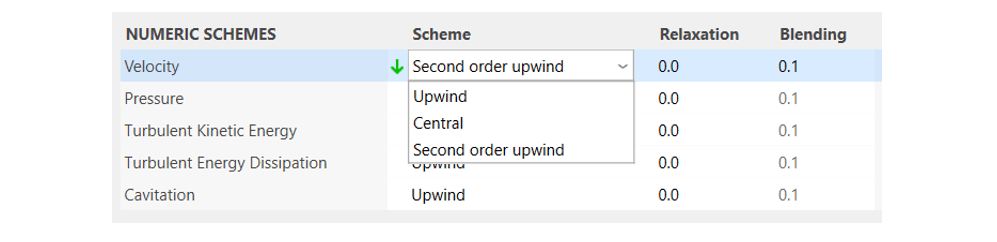
Simerics MP/MP+ numeric schemes
The Upwind method yields good convergence and is fast, but less accurate. The 2nd order upwind method delivers greater spatial accuracy but is less robust. To overcome convergence difficulties and instabilities at certain flow conditions while keeping improved accuracy a discretization blending factor between the first-order and the higher-order scheme may be set when using the higher-order 2nd order upwind or central method. Upwind uses a first-order discretization scheme throughout, so the blending factor option is obsolete and unavailable in this case.
Please refer to the Simerics MP/MP+ documentation for further details.
Setup for transient CFD runs
A transient simulation achieves more accurate results than a steady-state frozen rotor simulation by computing the interaction between a rotor and a stator or between an impeller and a volute. It also makes the computation of unsteady effects such as intense cavitation possible. In addition to the result file from the stationary simulation, one or more result files from the transient simulations will be available, depending on the settings.
Run type
If the Run type is set to Steady and transient or Transient, a Transient tab appears in the SOLVER SETTINGS with the sections
RUN SCHEME
CONVERGENCE SETTINGS
NUMERIC SCHEMES and
TIME ACCURACY
The items Parallel simulation, Cavitation, and Gravity force have the same function as explained above.
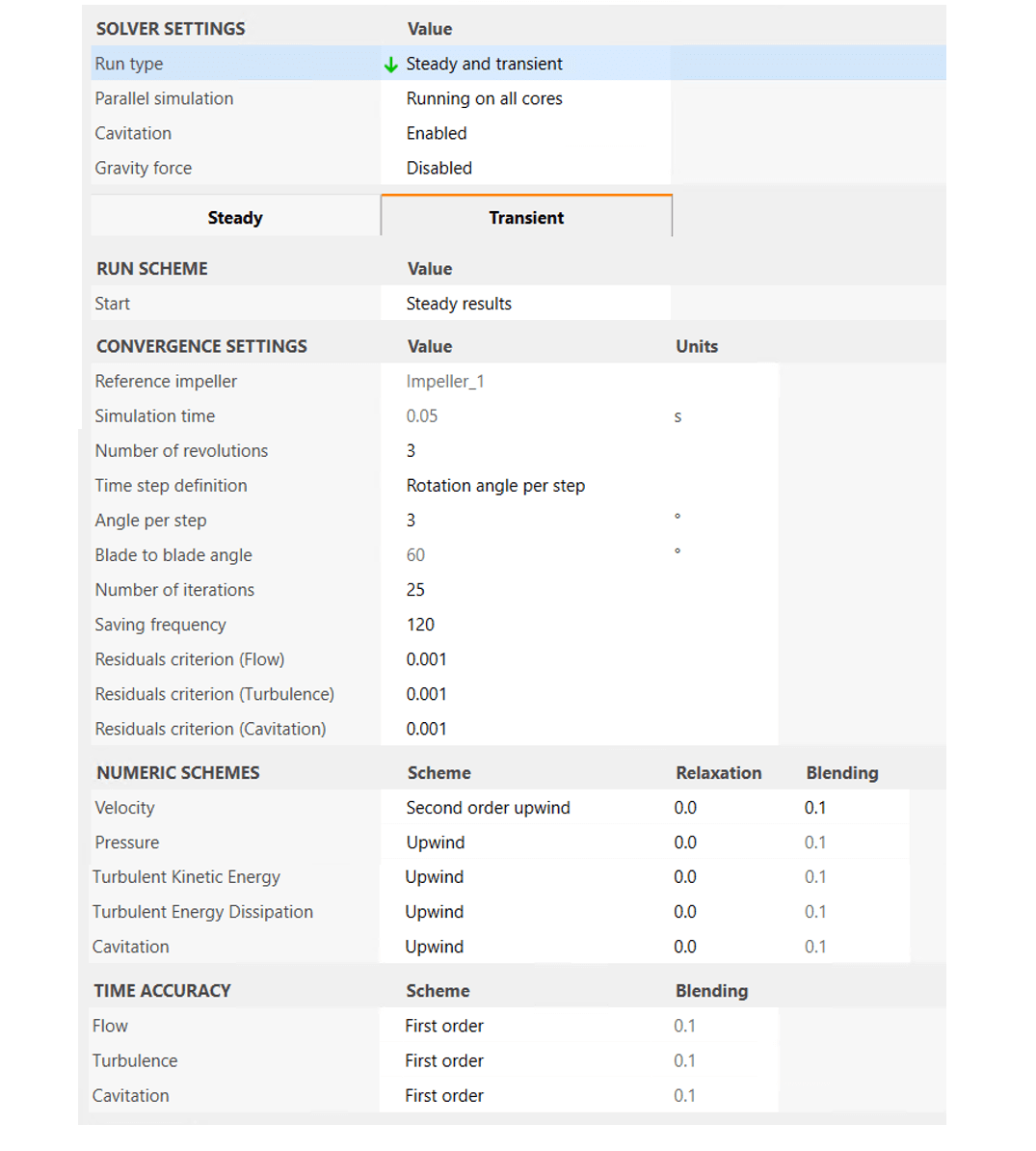
Configuring transient flow simulations in the SOLVER SETTINGS
RUN SCHEME
Under RUN SCHEME, the two familiar Start options Initial values and Continuation, which start a CFD run without or with initialization by an existing result, appear along with the third option Steady results, which initializes a transient CFD run with the result of the steady-state simulation.

CONVERGENCE SETTINGS
The CONVERGENCE SETTINGS for a transient simulation quite differ from those of a steady-state simulation because the temporal resolution of the rotor movement, i. e. the time step has to be defined, which is a decisive factor for a successful transient flow simulation. With steady-state simulations the rotor remains in a fixed, “frozen” position and its momentum transferred to the fluid is modeled, while with transient simulations the rotor mesh is rotated by a specified angle at each time step so that the momentum transferred is calculated directly.
A coarse temporal resolution, which is equal to a large rotational angle per time step, may lead to poor accuracy, stability, and convergence while a fine temporal resolution requires more computational time.
For a multi-stage CFturbo design, the rotor to which the rotation angle refers is set in the Reference impeller option. For a single-stage design the name of the only rotor is displayed here.

Selection of the Reference impeller for a three-stage turbomachine
Simulation time is the time span of the real process that is reproduced by the flow simulation. It is calculated from the rotational speed of the Reference impeller and the Number of revolutions specified for the simulation.
Time step definition is possible in two ways: using the Rotation angle per step option and specifying the Angle per step, or using the Steps per segment option and specifying these Steps per segment, whereby the Blade to blade angle known from the CFturbo design is displayed for estimating a suitable value.
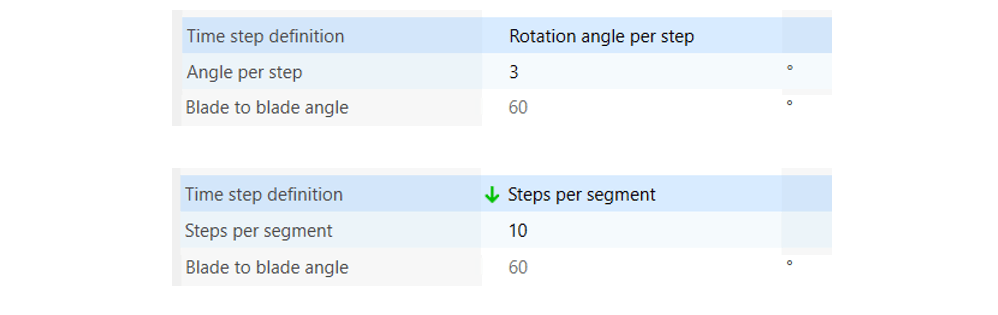
With transient flow simulations the Number of iterations refer to the inner iterations that are performed within each time step to ensure the convergence of the solution to a stable state. The number of inner iterations required depends on the desired accuracy of the simulation and also on the complexity of the flow field. As soon as the convergence criteria are met, this internal iteration loop is of course terminated.
Saving frequency defines the number of time steps at which a file with transient results is written. Simerics MP/MP+ appends the number of the current time step to the name of the respective .sres file, creating a whole series of result files that can later be used, for example, to create movies. The files are stored in the directory of the corresponding operating point.
The following transient convergence criteria for the Simerics MP/MP+ modules Flow, Turbulence, and Cavitation are the same as for steady-state simulations, but only apply to the inner iterations at each time step and, once reached, do not terminate the simulation:
Residuals criterion (Flow) - range 1e-05 .. 0.1
Residuals criterion (Turbulence) - range 1e-05 .. 0.1
Residuals criterion (Cavitation) - range 1e-05 .. 0.1
The convergence of a transient simulation is achieved by having the solution settled to a periodic pattern. In CFturbo BLADERUNNER the number of rotor revolutions required for this process can be easily assessed graphically in the Convergence plots tab while the simulation is running.
NUMERIC SCHEMES
The NUMERIC SCHEMES section is identical to the according section above for steady-state simulations.
TIME ACCURACY
Simerics MP/MP+ offers three different temporal discretization schemes:
First order - first-order Euler implicit time scheme
Second order - three-level second-order Euler implicit time scheme
Crank-Nicolson - Crank-Nicolson method
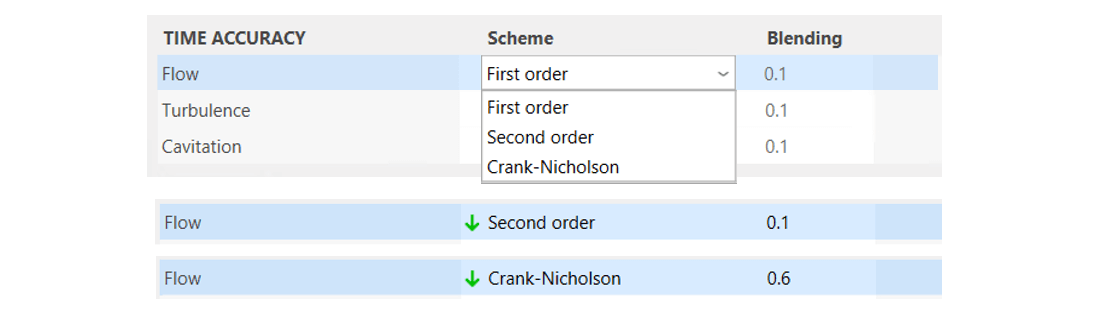
The First order scheme is set by default in CFturbo BLADERUNNER, being the fastest but also least accurate of the three schemes.
For the Second order scheme a blended formulation of the first-order and second-order Euler time schemes is used in Simerics MP/MP+ to achieve a bounded solution while mostly maintaining second-order time accuracy. The according Blending factor is set to 0.1 by default.
For the Crank-Nicolson method this method, which combines the first-order forward Euler method and the backward Euler method, also uses a Blending factor set to 0.5 by default in Simerics MP/MP+. A higher value of 0.6 is recommended and set as the default value in CFturbo BLADERUNNER to avoid oscillatory solutions.
Having completed all the solver settings, it's time to start and monitor a flow simulation!